
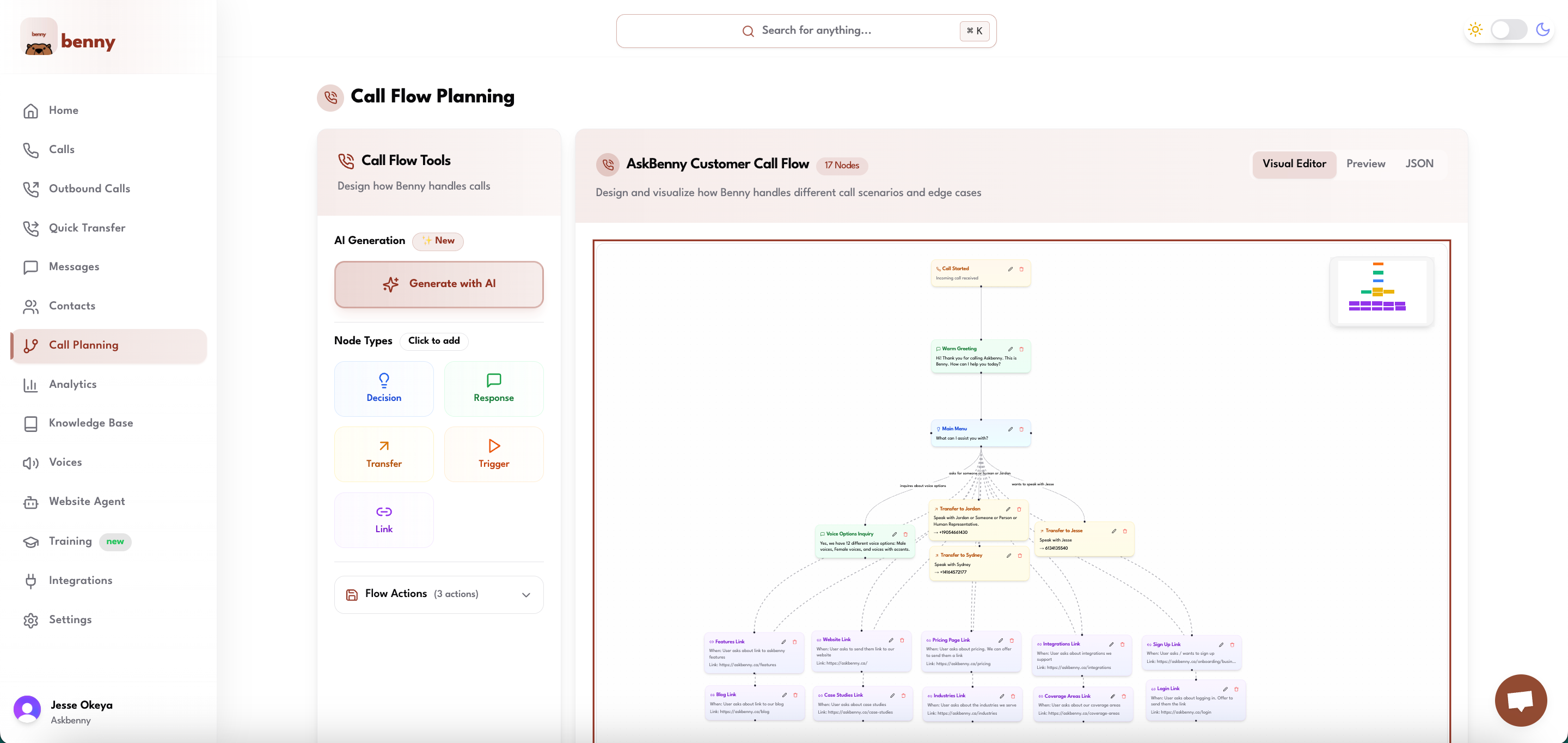
Call Planning in your Ask Benny dashboard allows you to design exactly how your AI receptionist handles calls from start to finish. Using a visual builder, you can map out every step of the caller’s journey to ensure consistent, professional, and efficient interactions.
This feature gives you complete control over how Benny responds, routes, and transfers calls based on real-time conditions. Whether you want to automate appointment booking, handle multiple departments, or manage after-hours responses, Call Planning lets you build it all visually.
Design Intelligent Call Flows
The Call Flow Planning tool uses a simple drag-and-drop interface that makes it easy to build and modify your call structure. You can connect different types of nodes to create custom call paths that suit your business needs.
Available node types include:
- Trigger nodes: Define how each call begins.
- Response nodes: Use AI-generated or pre-set replies to guide the caller.
- Decision nodes: Route callers based on their responses or detected intent.
- Conditional Link nodes: Share specific resources or URLs when certain conditions are met.
- Transfer nodes: Transfer calls to designated team members or departments.
You can preview and test your flow before publishing to make sure Benny handles every scenario smoothly.
Learn more about how Benny’s AI engine processes calls on the How It Works page.
Generate Call Flows with AI
For a faster setup, you can use the Generate with AI option inside the Call Planning interface. Simply describe your business type and the kind of calls you receive, and Benny will create a suggested call flow for you. You can then review, edit, and customize it to match your preferences.
This helps new users get started quickly while still maintaining full control over routing, transfers, and responses.
Advanced Routing and Transfers
Call Planning supports advanced routing logic to help you manage multiple departments, services, or team members. You can:
- Forward calls to different phone numbers based on caller intent or department.
- Route high-priority calls to managers or owners.
- Direct routine inquiries to automated responses.
- Create separate flows for business hours and after-hours handling.
These features ensure that every caller is connected to the right person or information without unnecessary delays.
Learn more about advanced routing and integrations on our Features page.
Multiple Booking and Appointment Links
You can integrate multiple booking or appointment links directly into your call flows. For example, a dental office might include links for new patient consultations, hygiene visits, and follow-up appointments. Benny can identify the caller’s request and provide the correct link automatically.
This creates a seamless scheduling experience for callers and reduces administrative workload for your team.
Adding Call Planning to Your Prompt
The Call Planning feature works alongside your main prompt to give Benny more control over each stage of a conversation. You can define specific triggers, responses, and routing rules that activate based on the caller’s needs.
If you already use the Knowledge Base, you can combine both features to make Benny even smarter - the Knowledge Base supplies detailed information while Call Planning handles the structure and flow of the call.
To begin using Call Planning, log in to your Ask Benny dashboard and open the Call Planning tab. You can start from scratch or use the Generate with AI option to build a base structure. From there, drag and connect nodes to customize your flow, then test it before activating.
If you need help, visit our Training Center, message us on chat, or contact our support team at info@askbenny.ca.

About Benjamin Beaverton
Benjamin Beaverton is Ask Benny’s resident expert in all things AI, call handling, and small business success. A proudly Canadian beaver with a knack for staying busy, Benjamin shares insights from the virtual front desk - where no call goes unanswered and no customer is left waiting. When he’s not helping businesses boost their customer service, you’ll find him fine-tuning Benny’s scripts, building better workflows, and occasionally gnawing on tech trends.
Follow Benjamin for smart tips, fresh updates, and a peek behind the bark at Ask Benny HQ.